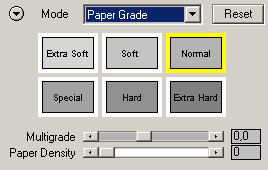
Paper Grade
The Paper Grade mode reproduces
the effect of multigraded photo papers that were used in traditional B/W photography.
Preset Icons
Clicking one of the preset
icons will activate the appropriate effect by setting the sliders below to certain
values. The same presets can also be found in Photography Mode, B/W Quick Mode
and Expert Mode. For more information about the presets, please read the Local
Presets page.
Sliders
The Multigrade slider ranges from -2.0 to +3.0. A value of zero will have no effect on the image, values below zero will make the image appear softer and values above zero will increase the edge contrast.
The Paper Density slider controls the roughness of the effect. Higher values will make the effect rougher whereas low values will produce an effect with finer details.
Hyper Links
The two hyper links at the bottom let you switch to Photograph Mode or to Expert Mode. Alternatively you can also use the Mode combo box at the top for doing that.