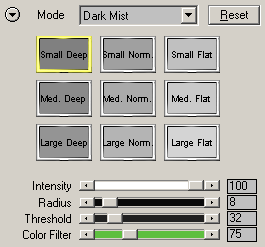
Dark Mist
The Dark Mist mode lets
you add diffuse shadows to the image.
Preset Icons
Clicking one of the preset
icons will activate the appropriate effect by setting the sliders below to certain
values. The same presets can also be found in Photography Mode, B/W Quick Mode
and Expert Mode. For more information about the presets, please read the Local
Presets page.
Sliders
The Intensity slider controls the strength of the effect and the Radius slider controls its smoothness of the mist. The Threshold slider lets you expand the mist effect to other image areas and the Color Filter slider influences the location of these image areas.
Hyper Links
The two hyper links at the bottom let you switch to Photograph Mode or to Expert Mode. Alternatively you can also use the Mode combo box at the top for doing that.