If you want to install the full version and already installed the trial version, you normally do not need to uninstall the trial version. The trial version will be overwritten when installing the full version - provided that you install the full version to the same location as the trial version and under Windows choose the same application(s) in Plugin Installer. If you are not sure, you can nevertheless uninstall the trial version before installing the full version.
To uninstall MetaRaw go to Start > Control Panel > Uninstall a program (Windows 7) or right click the Start button, select Control Panel and click on "Programs and Features" (Windows 8 & 10). On the appearing dialog double click the appropriate item to uninstall it. Under MacOS X you can manually delete the "ElementsXXL.plugin" file from the Plug-Ins folder of Photoshop Elements. Alternatively you can use the Uninstall icon of the .dmg file to remove all copies of ElementsXXL.
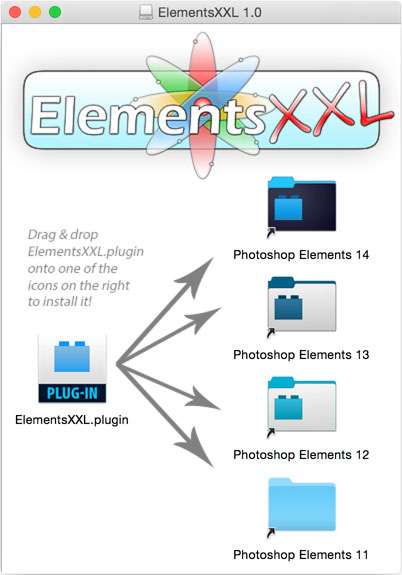
Double click the downloaded .dmg file and then drag and drop "ElementsXXL.plugin" onto the one of the icons on the right in the same window. For example if you are using Photoshop Elements 14, please drag and drop the "ElementsXXL.plugin" icon onto the "Photoshop Elements 14" icon. If Photoshop Elements should be running, quit and start it again in order to use ElementsXXL. Alternatively double click the Install icon to install ElementsXXL into all available Photoshop Elements versions.
You can also double click the Install icon in the new .dmg window. Alternatively double-click one of the folder icons (according to your used Photoshop Elements version) on the right side in the same window and drag the "ElementsXXL.plugin" file into the new window. If this does not work open the Applications/Adobe Photoshop Elements/Support Files/Plug-Ins folder in a new Finder window and drag the "ElementsXXL.plugin" file into it.
Double click the downloaded .exe file and follow the installation instructions.
When Plugin Installer shows up, activate the check boxes of your preferred application(s)
and press the Install button.
You can run Plugin Installer at any time from Start > All Programs > The Plugin Site > ElementsXXL > Plugin Installer. Then you have more options than during installation, e.g. an Uninstall button.
If you install a new version of Photoshop Elements and ElementsXXL is already installed, you do not need to run the full ElementsXXL installation again. You can run Plugin Installer from the Start menu and use it to install ElementsXXL into the newly installed version of Photoshop Elements.