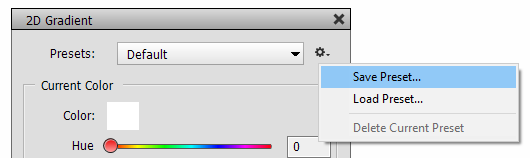
Each filter, fill and adjustment layer of AdjustShop offers a Presets feature at the top of the dialog. Instead of repeatedly explaining for feature, it is collectively done here.
The Preset combo box contains preset items that apply various settings to the controls of a filter, fill or adjustment layer. AdjustShop comes with many preset for each filter, fill or adjustment layer, so there are plenty of effects to explore and test. The Default item at the top of the combo box list restores the default values for all controls. The Custom item at the bottom is automatically selected if a control is changed indicating that the original preset or default values are not used anymore.
You can also open a preset file from the icon menu at the right hand-side by clicking the Load Preset men item. This displays a file dialog for selecting the preset file. Usually it is more convenient to select a preset from the combo box.
The Save Preset menu item saves the current settings as a preset file for later use. In the appearing file dialog best keep the preselected folder to make sure that the new preset appears in the Preset combo box.
To delete a preset choose it from the combo box and then select the Delete Current Preset menu item. This removes the preset from the combo box but also deletes the corresponding preset file.